Most people buy a vape, take it out of the box, and use it exactly as it came - never touching the little slider on the side. That is a shame, because on a device with adjustable airflow, that slider is the single most powerful control you have. It changes flavor intensity, cloud size, throat hit, vapor temperature, and even how long the device lasts.
The best part: it costs nothing to experiment with. One adjustable airflow vape can feel like three completely different devices depending on where you set it. This guide explains what the control actually does, how to find it, and exactly how to dial it in for the experience you want.
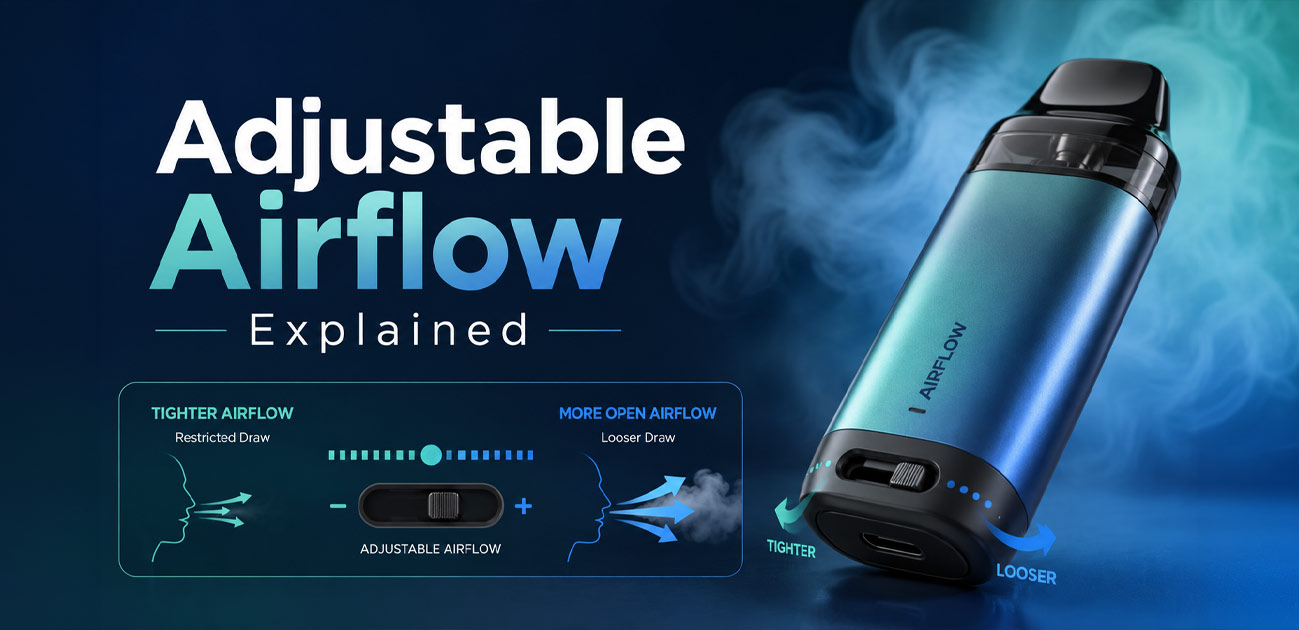
Adjustable airflow is a slider, ring, or dial that changes how much air mixes with your vapor. Tighter = less air = warmer vapor, stronger flavor, stronger throat hit, smaller clouds, more draw resistance. More open = more air = cooler vapor, softer flavor, softer throat hit, bigger clouds, easier draw. Start in the middle and adjust from there.
What is adjustable airflow?
When you inhale on a vape, air is pulled in through small vents, passes over the heated coil, mixes with the vapor coming off the e-liquid, and travels up to your mouth. Adjustable airflow is a control that changes the size of those vents - and therefore how much air joins the vapor on its way to you.
That is the whole mechanism, and it is simpler than people expect. Less air means the vapor stays concentrated: denser, warmer, more intensely flavored. More air means the vapor gets diluted: thinner, cooler, softer, but larger in volume. Everything else follows from that one variable.
Think of it like a garden hose: Cover part of the opening and the spray becomes narrow and forceful. Open it fully and you get a wide, gentle flow. Same water, different feel - and airflow does exactly that to your vapor.
Where to find the control
Airflow controls come in a few common forms, and the first step to using one is knowing what you are looking for.
- A slider - the most common on disposables and pod systems. Usually a small switch on the base or side of the device that you push left or right.
- A rotating ring or collar - found on tanks and refillable devices. You twist it to open or close the air slots.
- A dial - on more advanced devices, offering finer, more precise steps.
- Multi-position switches - some newer disposables use a 2- or 3-position toggle rather than a smooth slider, giving you preset settings.
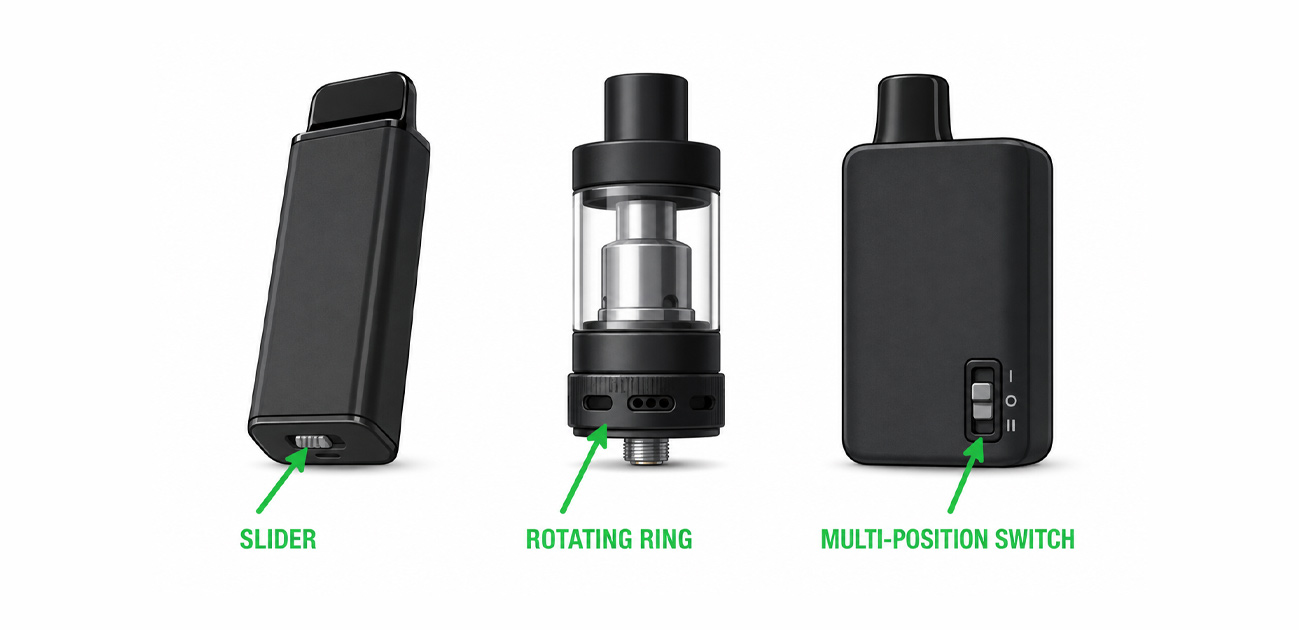
An adjustable airflow vape will always have one of these somewhere on the body. If you cannot find a control anywhere on your device, it likely has fixed airflow - the vents are set at the factory and cannot be changed. That is still the norm on simpler, lower-cost disposables, and it is not a flaw. It just means the manufacturer chose the setting for you.
The core trade-off: tight vs open
Everything about airflow comes down to one trade-off. You cannot maximize flavor and clouds at the same time - you choose where on the spectrum you want to sit.
| What changes | Tight airflow (closed) | Open airflow |
|---|---|---|
| Flavor | Concentrated, intense | Softer, more diluted |
| Vapor temperature | Warmer | Cooler |
| Cloud size | Smaller, discreet | Bigger, denser volume |
| Throat hit | Stronger, sharper | Smoother, softer |
| Draw resistance | More - like a cigarette | Less - airy and free |
| Best for | MTL (mouth-to-lung) | DTL (direct-to-lung) |
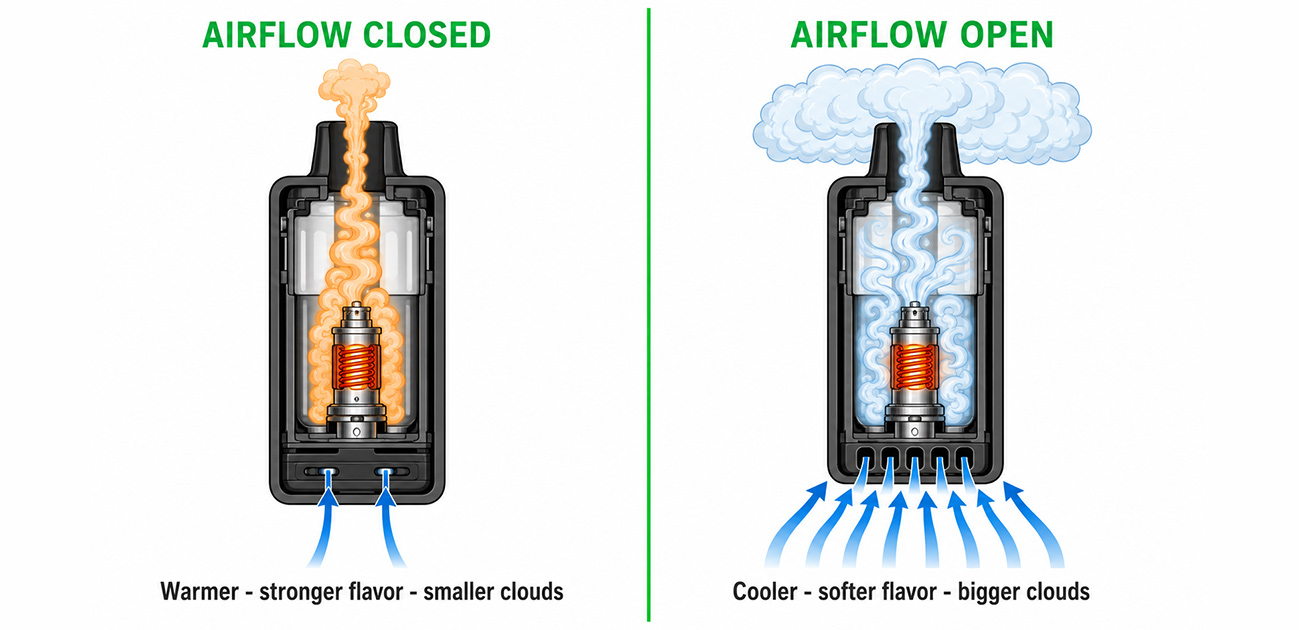
The connection to draw style: Tight airflow is what makes an MTL (mouth-to-lung) draw possible - the cigarette-style inhale where you hold vapor in your mouth first. Open airflow enables DTL (direct-to-lung), where vapor goes straight to the lungs. Our MTL vs DTL vaping guide explains the two styles in depth; this article is about the control that gets you there.
The 5 things airflow changes
Move that slider and five things shift at once. Understanding each one tells you which direction to go.
-
1. Flavor intensity
Tighter airflow means less air diluting the vapor, so flavor compounds arrive more concentrated. This is why flavor chasers often close the airflow down. Open it up and the same e-liquid tastes softer and less pronounced - not worse, just lighter.
-
2. Vapor temperature
Air cools vapor. Restrict it and the vapor arrives warmer, which many people find more satisfying and cigarette-like. Open it and you get a noticeably cooler inhale - useful with menthol and ice flavors, or in hot weather.
-
3. Cloud production
More air carries more vapor volume, producing bigger clouds. If you want to be discreet, tighten the airflow. If you want visible plumes, open it. This is the most obvious change and the easiest to test.
-
4. Throat hit
Concentrated, warm vapor hits the throat harder. If your device feels too harsh, opening the airflow softens it immediately - often more effectively than switching to a lower nicotine strength. If it feels too weak and airy, tightening it sharpens the hit.
-
5. Draw resistance
This is the physical feel of the pull. Tight airflow requires more effort, resembling the resistance of a cigarette. Open airflow is nearly effortless. Ex-smokers usually prefer the tighter, more familiar resistance.
Does airflow affect your puff count?
Yes - and this surprises a lot of people. Here is the accurate explanation, because it gets misreported constantly.
Airflow does not change how hard the coil fires. The coil produces the same heat for the same duration regardless of where the slider sits. What changes is your behavior. Open airflow invites longer, deeper, more relaxed draws, and longer draws vaporize more e-liquid per puff. Tight airflow encourages short, sharp, cigarette-like pulls that use less.
The proof is in how manufacturers rate their own devices. The Olit Hookalit S, for example, is rated at 35,000 puffs in tight MTL mode but only around 20,000 in open DTL mode - same device, same e-liquid, a 43% difference purely from the airflow setting. That is not marketing spin; it is the honest consequence of how each style consumes liquid.
Practical takeaway: If you want your device to last as long as possible, run it on a tighter setting. If you want maximum clouds and do not mind replacing it sooner, open it up. See our guide on how long a disposable vape lasts for the full picture on real-world puff counts.
How to dial it in, step by step
On an adjustable airflow vape there is no universal "correct" setting - only the one that suits you. This is the fastest way to find it.
-
1Start in the middle
Set the airflow roughly halfway open. Starting at an extreme makes it hard to tell which direction you actually want to go, and a fully closed setting can produce a harsh or burnt hit.
-
2Take three or four puffs
One puff is not enough to judge. Give the setting a fair test and pay attention to one thing at a time: is the flavor strong enough? Is the throat hit comfortable? Is the draw too tight or too loose?
-
3Adjust in small increments
Move the slider a little, not all the way. Big jumps make it hard to identify the sweet spot. Small, deliberate steps let you feel each change clearly.
-
4Chase one goal at a time
Want more flavor? Tighten. Want bigger clouds? Open. Too harsh? Open. Too weak? Tighten. Make one change per problem rather than fiddling with everything at once.
-
5Re-adjust for different flavors
Your ideal setting is not fixed forever. Menthol and ice flavors often shine with more open, cooler airflow. Rich dessert and tobacco flavors usually reward a tighter setting. Adjust when you switch.
Troubleshooting with airflow
Airflow is not just for tuning - it is a diagnostic tool. Several common vaping complaints have an airflow fix.
| The problem | The airflow fix |
|---|---|
| Hit is too harsh or hot | Open the airflow. More air cools the vapor and softens the throat hit. |
| Flavor tastes weak or thin | Tighten the airflow. Less dilution means more concentrated flavor. |
| Clouds are too small | Open the airflow and take a slightly longer draw. |
| Draw feels too easy or airy | Tighten the airflow for more cigarette-like resistance. |
| Burnt taste at the tightest setting | Open it slightly - too little air can scorch the coil. |
| Gurgling or leaking | Airflow may be closed too far, creating pressure imbalance. Open it a little. |
When it is not the airflow: If your device tastes burnt at every airflow setting, it is probably out of e-liquid, not badly tuned - see how to know when your vape is empty. If the draw is suddenly hard no matter where the slider sits, the airflow holes may be physically blocked, which is a clog - see how to unclog a disposable vape. And if it will not fire at all, try how to fix a disposable vape.
Which devices have adjustable airflow
The adjustable airflow vape used to be a niche product - the feature was reserved for refillable tanks and mods. That has changed. A growing number of disposables now include it, and they are worth seeking out. A few examples from the iVape catalog show the range of implementations:
- Olit Hookalit S 35K - A bottom slider that genuinely switches between MTL and DTL, with different puff ratings for each. One of the clearest examples of the feature done well.
- Losgal MC25000 - A 3-level airflow toggle covering MTL, RDL, and DTL, paired with adjustable wattage for two independent levers.
- RAMA TL16000 - Adjustable airflow on the device plus wattage control through a Bluetooth app.
- Lost Vape Orion Bar 50K - An airflow slider that the brand markets as "Nic Control," because tightening it reduces how much vapor and nicotine you take per puff.
- Off-Stamp X-Cube - The modular system whose pods offer adjustable sweetness and coolness alongside airflow tuning.
Plenty of excellent devices have fixed airflow and are none the worse for it. But if you like to tinker - or you are still figuring out what draw style suits you - a device with a slider lets you find out without buying three vapes. Browse the full disposable vapes range to compare.
Common mistakes to avoid
- Closing the airflow completely. Unless the device is designed for a fully sealed setting, blocking all air can scorch the coil, produce a burnt taste, and cause leaking from pressure buildup. Leave a little air.
- Judging a setting from one puff. Give each position three or four draws. Your perception adjusts, and one puff tells you almost nothing.
- Making big jumps. Sliding from fully closed to fully open skips right past your sweet spot. Move it a little at a time.
- Blaming the e-liquid. Before you write off a flavor as weak, try tightening the airflow. A lot of "bad flavor" complaints are really an airflow setting that is too open.
- Never touching it at all. The most common mistake of all. If your device has the control, use it - it is free performance.
FAQ
It is a control - usually a slider, ring, or dial - that changes how much air enters the device and mixes with the vapor when you inhale. Less air means a tighter draw with warmer, more concentrated flavor. More air means a looser draw with cooler vapor and bigger clouds. It lets one device deliver several different experiences.
Neither - they serve different goals. Tight airflow concentrates flavor, warms the vapor, and gives a stronger throat hit with a cigarette-like draw, suiting MTL vaping. Open airflow cools the vapor, produces bigger clouds, and softens the throat hit, suiting DTL. Most people land somewhere in the middle.
Indirectly, yes. Airflow does not change how hard the coil fires, but open airflow encourages longer, deeper draws that pull more e-liquid per puff. That is why some devices advertise two puff counts - a device rated for 35,000 puffs in tight MTL mode may only reach around 20,000 in open DTL mode.
Closing airflow too far restricts the air that cools the coil, which can scorch the wick and produce a burnt taste. It can also cause leaking from pressure imbalance. If you get a burnt hit at your tightest setting, open it slightly. If the burnt taste persists at every setting, the device is likely out of e-liquid.
Airflow does not change the nicotine concentration of the e-liquid, which is fixed. But it does change how much vapor you take per puff, so it changes how much nicotine you actually inhale. A tighter setting with shorter draws delivers less; an open setting with longer draws delivers more. Some brands market their airflow slider as "nicotine control" for exactly this reason.
WARNING: This product contains nicotine. Nicotine is an addictive chemical. For adults 21+ only.